


If you have an older version of sketchup (2014, 2015, 2016), and you can’t open a more recent file of Sketchup (like 2017) – for example because your computer doesn’t support a newer version of sketchup,
you can convert online your file by uploading in Google Warehouse. Unluckily there are not all the versions available, but it is a useful trick.
After the upload, you can download it in multiple versions.

FOR THE OPPOSITE: FROM 2017 TO 2014
Do you want to save in an older version?
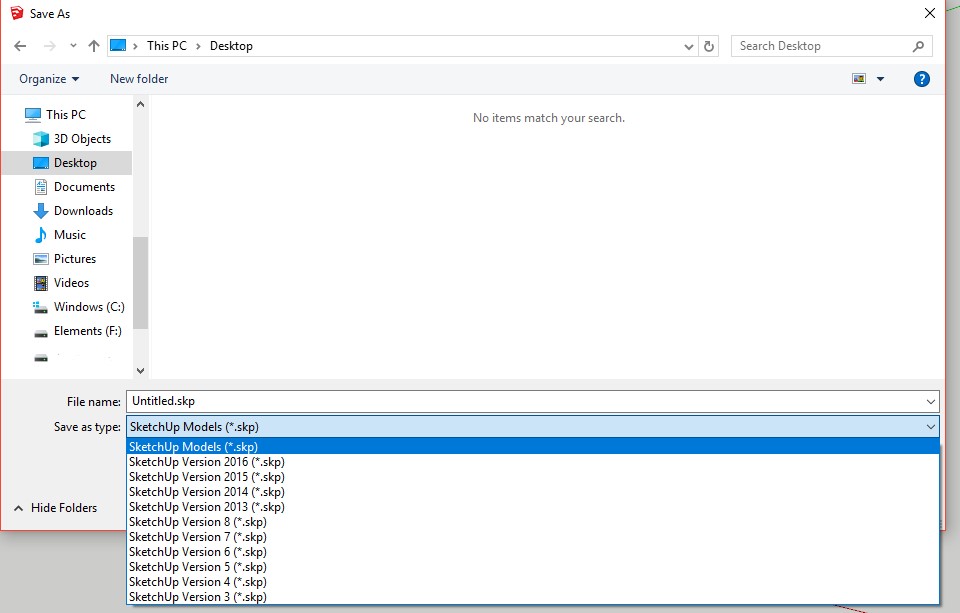
Click on File -> Save AS -> and choose the version you need.
Disclaimer: this is a fast guide, a tutorial, an how-to article that I personally wrote for you. Feel free to write here any kind of suggestion! It is helpful if you need to solve your problem, if you need a tip or if you are in trouble and you need an help! It is about Sketchup software, for 2018, 2019, 2017 and older versions.
thanks
Converter File SketchUp 2017 To 2014
you can download sketchup for free, then click save as and choose an older version of sketchup
lol. what if you have skp 2014 app and you have 2017 file? how can you open the 2017 ?
that’s what’s explained in this guide
CONVERTER FILE SKP
ITS NOT EVEN GOOGLE SKETCHUP ANYMORE
yes you are right!
No entendi, las graficas no ayudan mucho
thank you, I will improve it in the next update of the website